User Interface
We have implemented a simple Text User Interface (TUI) for Ledgera Clients so that users may interact with the Ledgera network via the Clients.
Description
The TUI has the following layout :
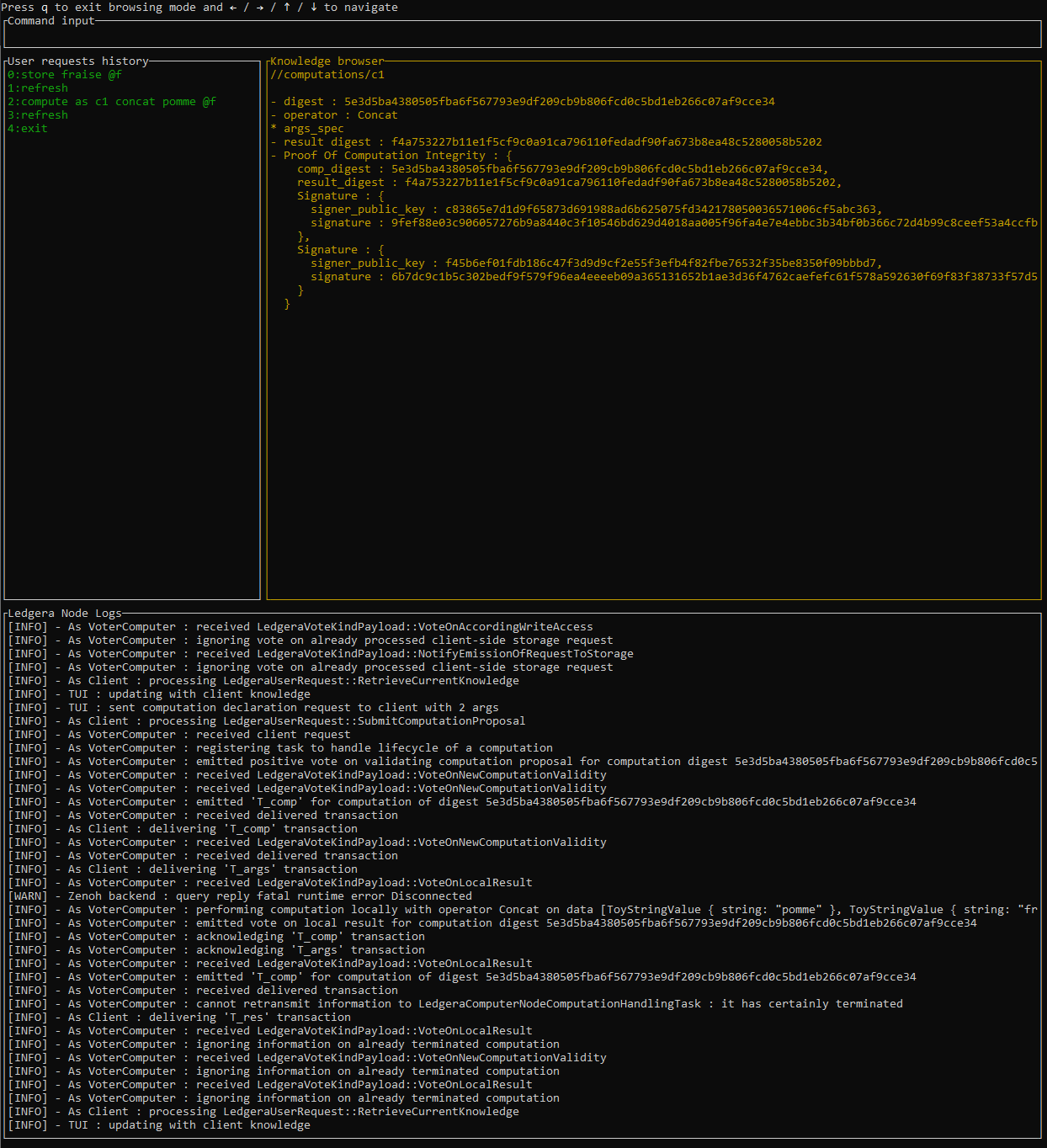
At the top the current input which is a text edition area in which the user may enter the commands it wants to send to Ledgera.
Below that one has some Ledgera-specific information:
- on the left the history of the previous commands
- on the right an explorer to explore the client’s knowledge of the system i.e.:
- known Proofs Of Storage
- which instances of computation it knows about and their status
- known Proofs Of Integrity for computations
- etc
Below that we have the log of the local Ledgera Node on which the client is running.
Interface Modes
The TUI operates in three distinct modes:
Main Menu Mode (Default)
- Starting point when you launch the TUI
- Controls:
e→ Enter Edition mode to type commandsb→ Enter Browser mode to explore client knowledgeq→ Quit and terminate the nodeh→ Show TUI help (commands, syntax)o→ Show computation operations help (available operations/predicates for compute based on use case)
Edition Mode
- Interactive command input for Ledgera operations
- Controls:
- Type commands and press
ENTERto execute - Type
exitand pressENTERto return to Main Menu
- Type commands and press
- Available commands:
store,compute,push_arg,get_value,refresh,rename(see details below)
Browser Mode
- Navigate and inspect the client’s knowledge of the system
- Controls:
- Arrow keys (
↑↓←→) to navigate the knowledge tree q→ Return to Main Menu
- Arrow keys (
- Browse:
- known promises of storages
- which computations it knows about and their status
- known proofs of integrity for computations
- etc
Detail of the commands
In Edition Mode, the TUI allows the user to interpret and forward commands to the Ledgera network via the Client.
Commands to manage the shorthand names
Values stored in the Ledgera storage as well as computation instances are unambiguously referred to via their digest. The textual representation of such a digest is a 64 characters string. It is impractical for a human user to use such strings. As a result, in our TUI, we allow the user to use shorthand names that are mapped to the digests that the client knows about.
Whenever the client on which the TUI runs is notified of the delivery of new transactions on the secure log or via dedicated notification messages, information it knows about the system may be updated.
If the client is informed that a new value has been stored on the storage (see T_{arch} transaction in the spec),
it associated a new unique shorthand name “d1”, “d2” … to that new piece of data.
Similarly, if the client is informed that a new computation instance has been declared (see T_{comp} transaction in the spec),
it associated a new unique shorthand name “c1”, “c2” … to that new computation instance.
The user may refresh the information available to the TUI and rename values/computations using the following commands:
refreshto pull info from the client and update with new default shorthand namesrename <name1> <name2>to rename a local shorthand
Commands to interact with the Ledgera network
store <value> @<name>to have the value encoded by the string<value>stored in the Ledgera storage. To avoid having to later use a 64 characters hash value (digest) to refer to this value, we can also give a shorthand<name>to that value (this<name>being only local to the TUI).get_value @<name>to retrieve from storage the value corresponding to the digest refered to by the<name>shorthandcompute as <name> <op> <args>to declare a computation and refer to it as<name>, this computation corresponding to an application of the<op>operator on arguments specified by<args>which is a space separated list of either:<value>for a raw concrete value@<name>for a reference to storage of the digest referred to by<name>*<name>for the raw concrete value stored locally under<name>(<pred>)for a predicate
push_arg <name> <index> <arg>to propose an argument for a computation refered by via<name>at a given<index>, this argument<arg>being either:<value>for a raw concrete value@<name2>for a reference to storage of the digest referred to by<name2>*<name2>for the raw concrete value stored locally under<name2>